Start here: the basics
What is an MCP server?
MCP is how an AI app gets to do things outside the chat window, like reading your calendar or opening a Jira ticket.
MCP stands for Model Context Protocol. An MCP server is a small program that gives an AI app a list of things it can do in some other system, such as "search Jira issues", and does them when the AI asks.
A model on its own only produces text. MCP is the part that lets it actually file the bug.
Why it exists
Connecting an AI app to Jira used to mean writing code for that one app and that one product. Every AI app needed its own version for every service, so most connections never got built.
MCP is a shared format for that connection. Jira's team writes one MCP server, and every AI app that speaks MCP can use it. Claude, ChatGPT, Cursor and VS Code all do.
Anthropic released it in November 2024. In December 2025 it moved to the Agentic AI Foundation at the Linux Foundation, so it isn't one company's format any more.
Servers and tools
The server sits in front of one product and offers tools. A tool is a named action with a description and the inputs it needs. A GitHub server offers search_issues, and it also offers merge_pull_request.
The app you type into is the host. The spec calls the part of it that talks to a server the client, but for most purposes the app and the client are the same thing.
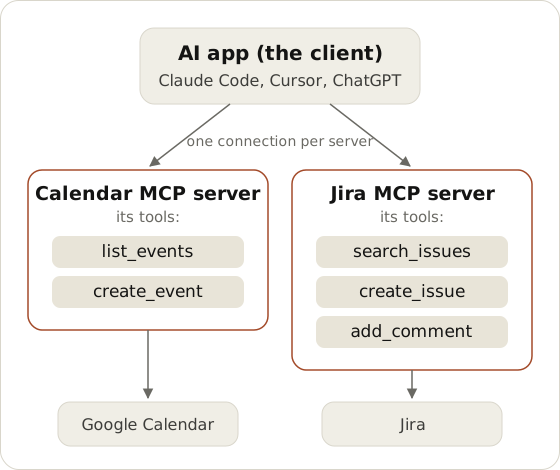 One AI app connected to two MCP servers. Each server has a short list of tools, and each tool does one thing in the product behind it.
Servers can also offer resources (things to read, like a file) and prompts (ready-made instructions). Tools are the part you'll deal with most.
What happens when you ask for something
Say you have a Jira server connected and you ask: "find the open bugs about checkout."
When the app starts, it asks the server what tools it has. That request is called tools/list, and the answer includes each tool's description. When you send your message, the model reads those descriptions and decides search_issues fits, with "checkout" and "open" as the inputs. The app sends that as a tools/call. The server makes a normal request to Jira's API and hands back the results, and the model writes your answer from them.
Nobody wrote code for "checkout bugs". The model picked the tool from its description, which is the useful part. It also means a model can pick a tool you didn't expect.
Local and remote servers
A local server runs on your machine. The AI app starts it as a program and talks to it directly. You usually paste an API key into a config file so it can reach the service.
A remote server runs on the vendor's side, and you connect by signing in. Sentry, Linear and Atlassian run their own.
The model can't tell the two apart. The difference is setup, and where the key ends up. How to add MCP servers to Claude Code connects one of each.
Where it gets risky
Connect a server and the AI gets every tool on it. If you connected GitHub so an agent could read issues, it can also merge.
That's fine on your own laptop with one agent. It stops being fine when a team shares keys, or when text in an issue or an email talks the model into calling the wrong tool (that's called prompt injection).
The fix most teams land on is a gateway between agents and servers. It decides which agent can call which tool and keeps the keys away from the agents. Every call goes in a log. That's what Statio does, and MCP permissions compares the approaches. To see where your own setup stands, try the MCP security checklist.
Next
See which servers exist for the tools you already use in the MCP server catalog. To build one, start with How to build an MCP server in Python. MCP vs APIs covers how a server relates to the API underneath it.